
New Features
New Operations Monitor
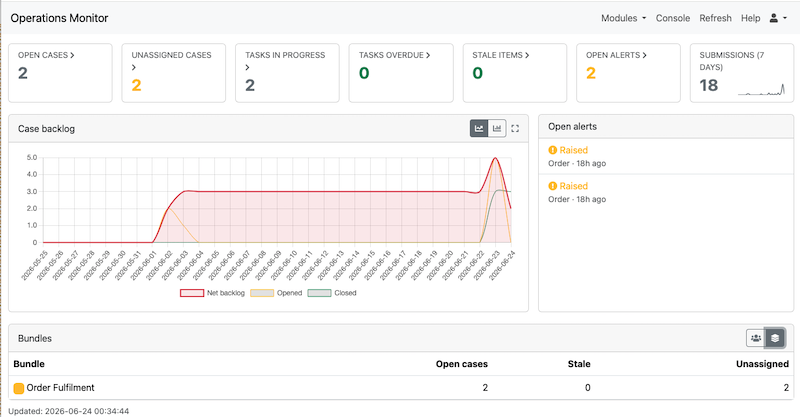
A brand-new operations monitor gives supervisors an at-a-glance overview of work across the organisation including; open cases, at-risk records and alerts. You can drill down by unit or role, view individual cases, and open a dedicated case viewer. This page is in the same module as the console. The Cases tab on the monitor page has been moved to the new operations page
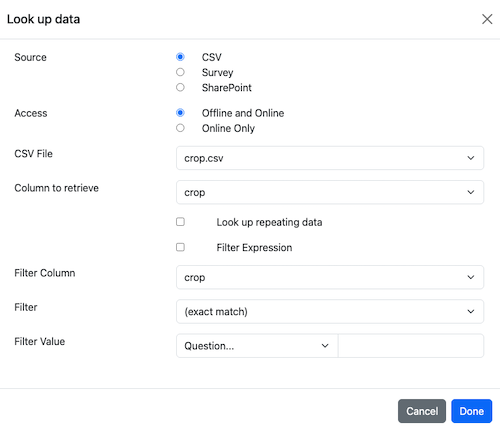
New Pulldata / Lookup Function Builder
A new point-and-click tool in the online editor lets you build pulldata (lookup) expressions without writing them by hand. You can choose the CSV or Forms source, you can lookup unique values or repeating values. This feature complements the existing search function builder to make adding reference data to a survey easier.
The pulldata and lookup functions are set in the calculation of a question, so you will find there a button that will open the builder.

The button will only be enabled if there is currently no pulldata/lookup function in the calculation or there is only a pulldata/lookup function. So you can’t use this builder to edit expressions that combine pulldata functions with other elements.
Reference Records
A new reference type which is effectively a read only case has been created. This gives multiple users read-only access to records.
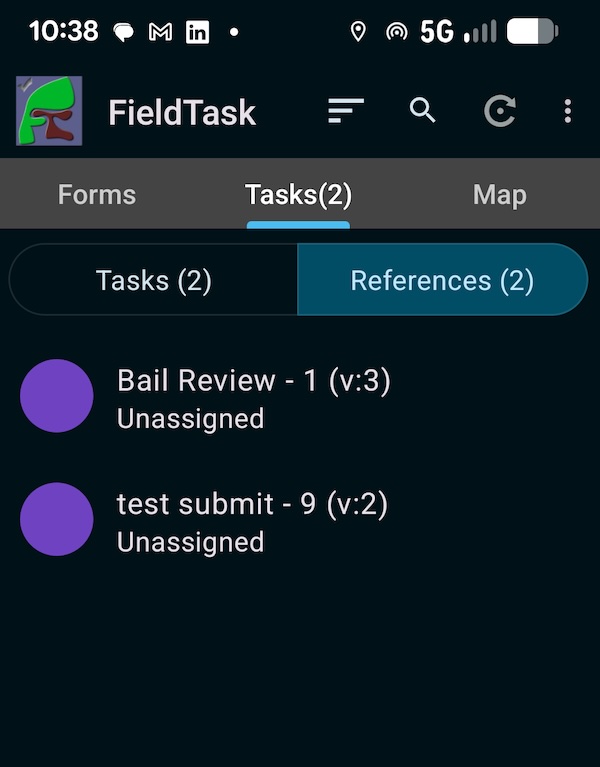
FieldTask will show reference records in the task tab. If a reference record exists then there will be a select control to choose Tasks or References. If someone has been assigned to a record then that will be shown in the list. The user can select the reference to view its contents or swipe horizontally to remove it from their phone.
References are particularly useful when your people are mainly using mobile phones to access data offline. The references will be copied into FieldTask when the user refreshes and can then be reviewed and deleted. You can set up a notification to automatically create references from submissions. References can also be added and removed from the console.
You will need version 5.2.02 or later of FieldTask to see references.
More information is available in the documentation.
Operations Summary Email
Periodic notifications can now send an operations summary digest by email, so managers receive a regular roundup without logging in. This complements the existing capability where a report on submissions can be sent periodically. To create this periodic report add a notification on the notifications or workflow page, set the trigger to “periodic” and select an operations report as the report.
Relative Date Ranges on Dashboards
The dashboard evolved to show the state of the system using all submitted data. It allowed you to add a fixed date range to individual panels but this could be laborious if you wanted the same date range applied to the entire dashboard.
To make the dashboard more useful for managing daily operations we have now added relative date ranges; last day, last week, last month or all. They apply to the entire dashboard. You can still add specific date ranges to a panel which will override the dashboard settings. Hence you could have a panel showing data from a specific week in the past to compare with the rest of the dashboard showing data from say, the last week.
Manage Dashboards on Behalf of Users
Each dashboard can be customised by the user. However sometimes it makes more sense for an administrator to set up a dashboard for somebody. This can now be done. Administrators will see a drop down list in the menu bar that allows them to select the user on whose behalf they will be acting.
Other
- Fixed an error that may be reported when logging in after a browser window is left connected for an extended period.
- Workflows now support a scheduled (periodic) start step that can send a report email on a recurring basis. These periodic items can be edited later to change their schedule, label or report.
- Workflow items for new forms are now positioned to avoid overlapping
- Workflow arrows no longer disappear when scrolling beyond the initial view
- Arrow-key navigation added to the WebForm form index panel
- The expanded notification dialog in WebForms can now be moved