
New Features
GDPR Compliance Toolkit
A suite of privacy management tools has been added to help organisations meet GDPR obligations.
Individual questions can be marked as containing personally identifiable information (PII). The three settings are:
- Not Personal data (The default)
- Personal data (Will be checked during DSAR and RTBF requests)
- Anonymise on Submit (The contents will be anonymised in FieldTask or WebForms before being sent to the server)
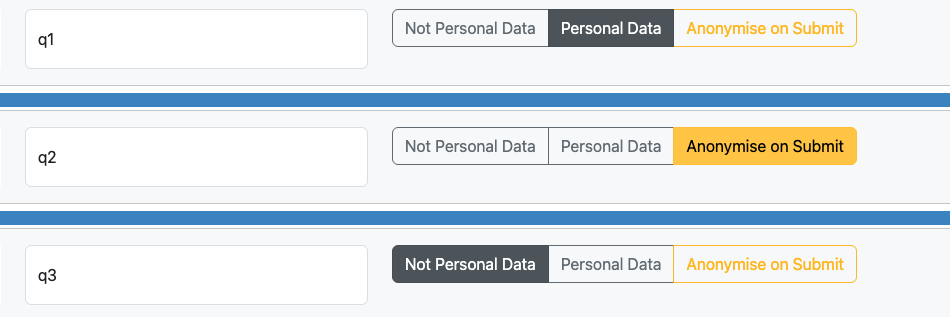
Anonymised data is encrypted using SHA256, it can still be used for analysis as the encryption is consistent and the same input will create the same output, however the original value is not available. This is ideal for data such as identity card numbers.
A new Data Protection Officer (DPO) security group gives designated staff access to a privacy administration page. Only a user with “Security” or “Organisational Manager” privileges can give a user the DPO security group. This should not be given lightly as RTBF requests can result in the loss of data.
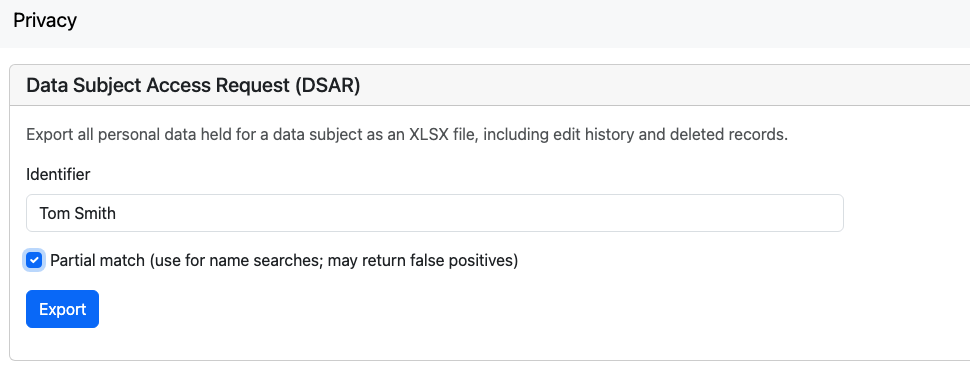
Data Subject Access Requests (DSAR) can now be exported into a spreadsheet from the privacy page. Data for questions that have their PII value set to “Personal Data” are searched. Searches include history and deleted rows as well as live records.
A Right to Be Forgotten (RTBF) form lets the DPO search for a subject’s data in questions that are defined as PII, review it, and redact any data found.
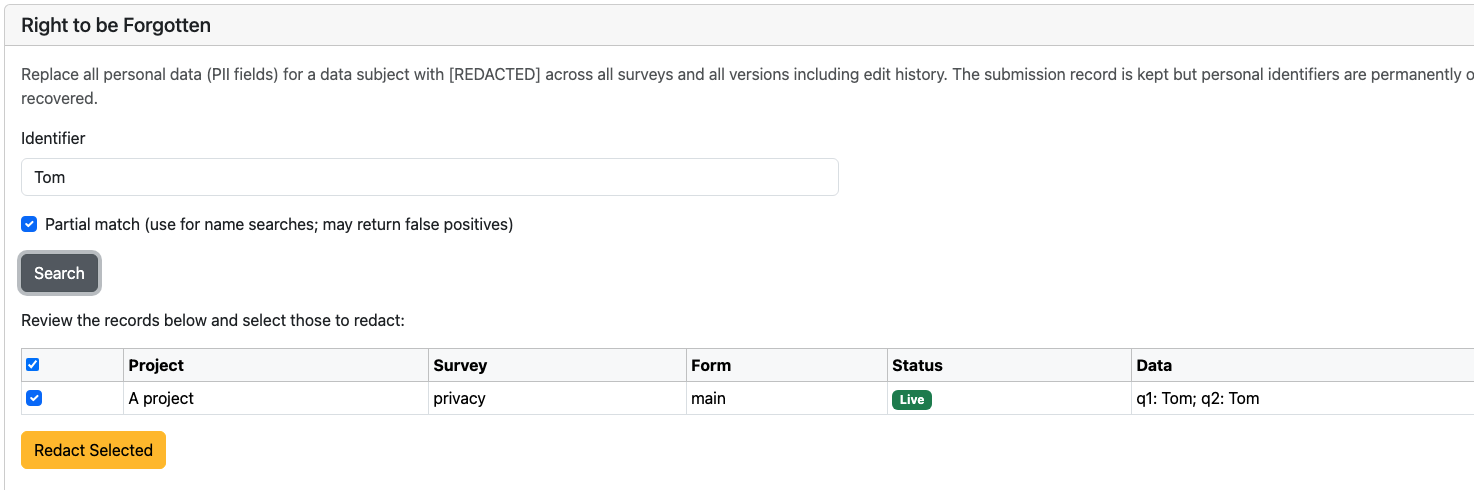
The final step “Redact Selected” will erase the data. This step is disabled by default unless “Enable Redactions” is set to yes in the organisation settings.
SharePoint Integration
Smap now integrates with SharePoint lists. This includes:
1. inserting or updating data in SharePoint lists when a new record is added or updated in Smap
2. Using SharePoint lists to provide choices for select questions.
3. Looking up reference data using the pulldata() function to provide guidance to the user or to manage the questions asked in the Smap form.
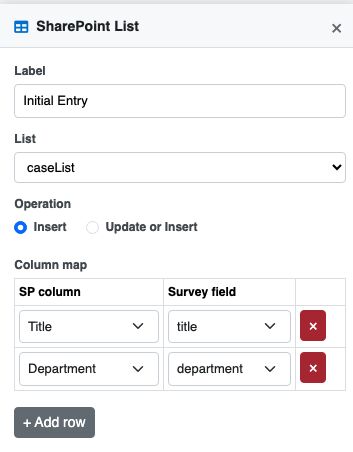
The image below shows configuration of a Workflow Item to insert an entry in a SharePoint list. This includes the mapping of survey questions to SharePoint columns.
Workflow Page
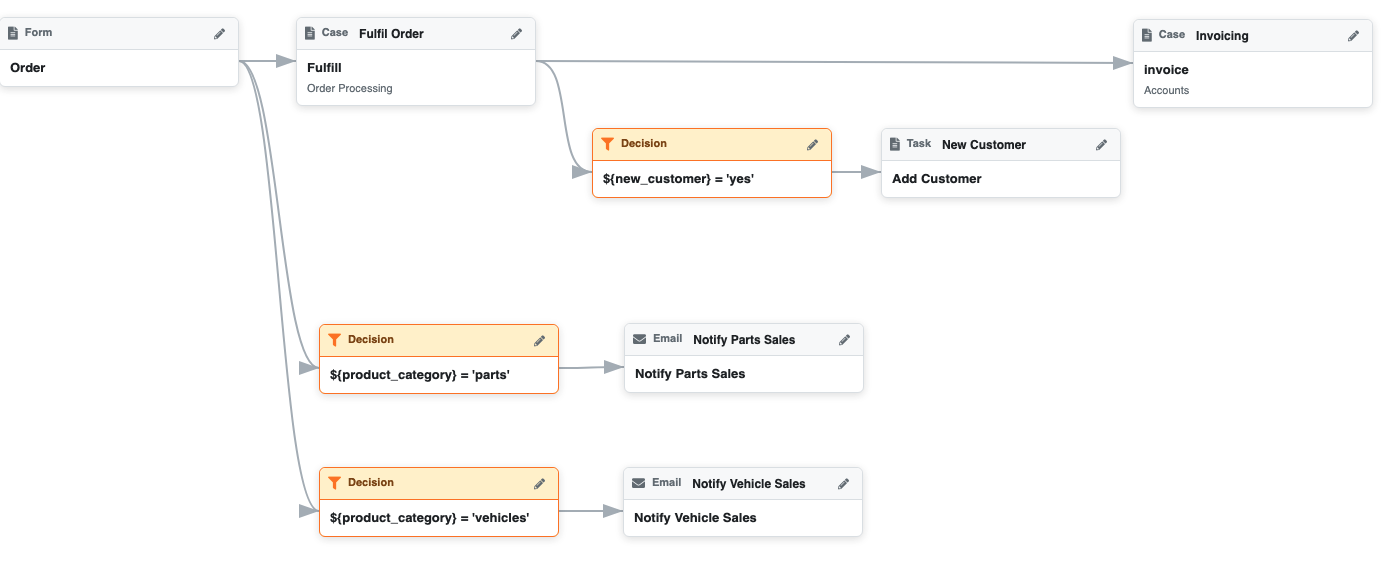
A Workflow page has been added. This is an umbrella for both tasks and notifications. Using the Workflow page you can create and manage tasks and notifications from a single place. If you have already set up tasks or notifications they will be displayed diagrammatically on the Workflow page, showing the connections between each triggering event and the task or notification it produces.
Notification Emails with Attachments
Email notifications sent from webforms and the workflow page now support file attachments. Attachments are saved to the record’s timeline so they appear in the history tab. Organisations can disable outbound webform notifications at the organisation level if needed.
WebForm Index
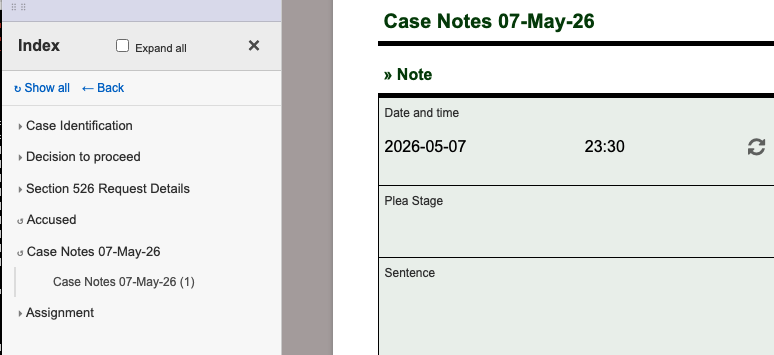
WebForms now has a collapsable index sidebar for navigating long forms. You can enabled WebForm indexes in the settings for a survey. They are particularly useful with cases where you are not working your way systematically through the form, instead you might open a case, quickly jump to a section you need to update and then submit the change.
Record History: Email Replies
Replies to emails, including attachments, sent from WebForms are now associated with the record and can be viewed in the History page in the console. This is currently only available if AWS SES is configured as the email server.
Record History: Attachments and Emails
The history tab on the console now shows attachments and inbound email responses alongside the submission timeline. History is now the default tab when viewing a record.
Ubuntu 26.04 and Tomcat 10 Support
The server-side stack has been upgraded to support Ubuntu 26.04 and Tomcat 10, including the migration from javax to jakarta namespaces and updated deploy scripts.
Other
- Console record filter “reset defaults” fixed, previously a user could not reset filters using the reset button in some circumstances
- Fix WebForm crash when a survey had multiple autocomplete selects in a repeat group
- IE11 support removed from WebForm
- Reduced the size of the WebForm client resulting in faster loading. This involved replacing node-forge with native hashes for digest calculation and downloading barcode libraries only if they are needed.
It is wonderful I am very interest with this new update on sharepoint intergration. However, how to create a sharepoint list in sg.smap.com.au?
Thank you
Hi Keo,
Yes good point. Sharepoint integrations can only be set at the whole of server level at the moment. I am considering expanding this so that it can be set up for a single organisation on a shared server like SG. Another option would be to use a server operated your organisation. You may want to discuss your needs directly with that team. Email me directly if you want specific contacts.
Regards
Neil