
Lots of security updates in this release listed under “Other”.
New Features
Smap Server installs on multiple Linux Distros
Most of our testing is still on the latest Ubuntu LTS distro and we won’t normally test a new release on other distros but the install and upgrade scripts have been modified to work on a broader range of distros.
| Distro | Support |
| Ubuntu 26.04 LTS | Yes. Changes are tested as a new install on this distro |
| Ubuntu 24.04 LTS | Yes. All changes are deployed as an upgrade and tested on this distro |
| Ubuntu 24.02 LTS. | Yes. We don’t operate any of these servers but if you report any issues they will be fixed. |
| Debian 13. | Yes. Successfully tested. |
| RHEL 10 | Yes. Successfully tested. |
| Amazon Linux Server | Yes. Successfully tested. |
If you find any issues using Smap on one of these distros let us know or raise a pull request to get it fixed. We will also consider adding support for other distros.
Adding “Group By” to Dashboard Map Panels
Actually this used to be a feature on the old dashboard before it was updated to use Bootstrap. Now its back but with a different implementation.
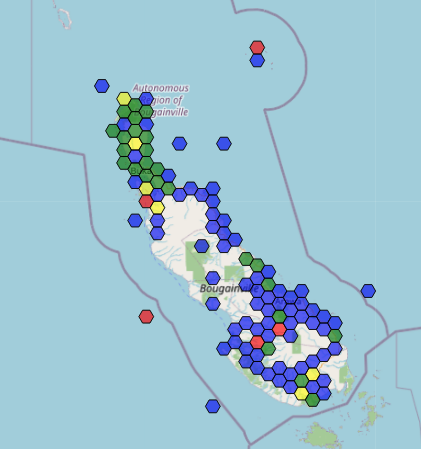
You can create hexagonal grids in the map panel by opening the drawer on the right of the panel. You then specify a name and the size of each polygon. You can also group by geoshape questions from inside your survey bundle. So for example you could record the boundaries of fields and use these to show location data on crops or soil samples.
Other
- Fix formatting of labels in a table list in WebForms.
- Fix formatting of WebForm print to remove menu bar choices.
- Self registration of new organisations is now a server setting, “Allow anyone to register a new organisation”, off by default.
- The registration page uses Turnstile when the server has Turnstile keys, limited to 3 an hour from one address, and to 20 an hour per server when Turnstile is not set.
- Email attachments that could run in a browser, such as html and svg files, are now downloaded rather than opened.
- When the connection to the mail server is encrypted then its certificate is now checked. Earlier versions encrypted the connection when the mail server offered it but accepted any certificate.
- Emails include one click unsubscribe headers, so Gmail, Outlook and Apple Mail show their own unsubscribe button.
- Re-subscribing: the subscriptions page now emails a link for each organisation instead of listing them on the page. Subscribe and opt in links work once and expire after 30 days.
- Contacts: An unsubscribed contact can now be deleted while keeping the email address unsubscribed.
- New servers have password strength set by default so that a strong password is required by default. The server admin user can then change the default password strength from the server settings page.
- When the admin user first logs on to a new server they are forced to change their password.
- When a password is changed the existing password cannot be reused.