
New Features
Dashboard updated
The dashboard now uses Bootstrap, like the rest of the system providing a more consistent user interface.
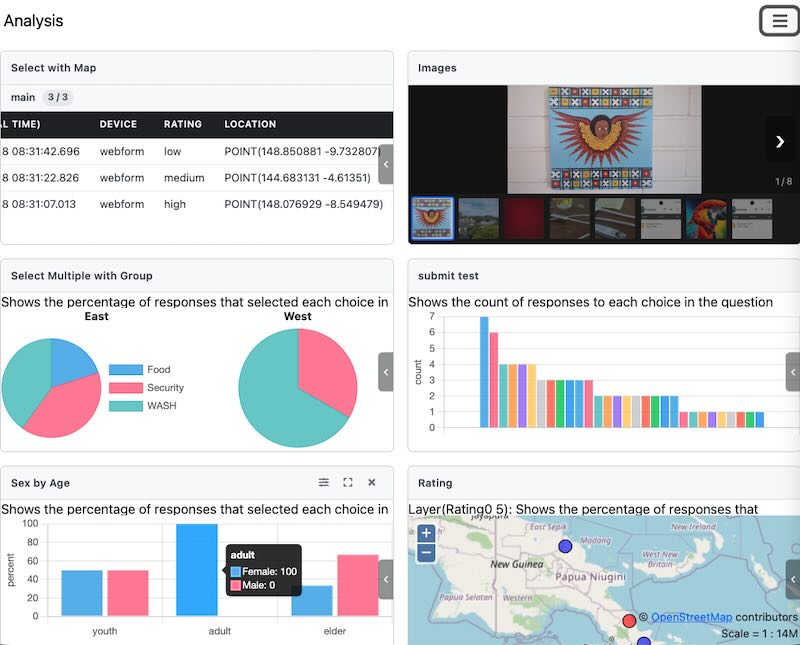
This was quite a difficult change to make due to the complexity of the code and how older user interface tools were fully embedded in it. I tried to do the update once before and gave up. However this time AI coding tools made the update possible.
You will notice that the Smap dashboard looks a lot nicer than it did before, however it still has the same function which is to provide a free and quick check on emerging issues in your surveys and to provide an operational overview where you can assess the state of your organisation’s processes at a glance.
As before it does not provide drill down, or in depth analysis capabilities. If you discover issues using the dashboard you can turn to your AI tools, a dedicated (and more expensive) dashboard, or analysis tools like R or spreadsheets to fully understand the situation.
Code is smaller and faster to load
Previously we used the older AMD approach to managing code modules. This was getting harder to maintain which resulted in code that was not always optimised.
Other Changes
- Upgraded the entire client from Bootstrap 4 to Bootstrap 5 (not just the dashboard)
- When you create a table view panel in the dashboard you can unselect the option “Show Meta Data” to hide the meta data. This allows you to focus on the answers to questions without having to scroll past start and end times etc.
- Pie charts are available as a graph type in the dashboard now. Along with the previously supported histograms and line graphs for time-based data
- Pie charts support “Group By”. A separate pie chart will be created in the panel for each distinct group by value
- Accept / Reject tasks. You can now accept or reject a task from the WebForms launch page
- Self assigned tasks are now shown in a different style in the WebForms launch page
- Reliability fixes for sending campaign emails
- WebP image support
- Bundled Survey Names. Survey bundles now use the bundle name configured in the case management settings when displaying surveys to users
- Highly visible “Reset Filters” option in the console. If you add filtering to your console data the “Reset Filters” menu will be shown in red and bolded. Just to remind you that you are filtering your data in case you wonder where your records went.
- “Language” no longer shown as an option when exporting to CSV files. Language is only used on spreadsheet exports to add the labels to the data headers.
- The project select and add panel controls are included in the menu bar in the dashboard. This leaves more room to show the dashboard panels.
- Improvements in efficiency of the background processes that load submissions into the database and generate tasks and notifications. This will reduce the load on the database server and memory usage.
- Include the availability of self assigned tasks in the tasks count shown for each user
- Add a “hideinwebform” appearance so that questions can be hidden in WebForms but visible in FieldTask